

D-Link AV2 1000 Gigabit Starter Kit Review
Easy set up, faster speeds, affordable price tag. The D-Link AV2 1000 Gigabit Starter Kit is a genuinely good piece of tech that does exactly what it says it will.
What we loved
- Super fast install
- Significant increase in download and upload
- Good price
What could be improved
- Multiple connections would be nice
95/100
$174
I’ve got a weird internet situation in my house - the main port for the modem/router is upstairs and most of the data-sucking appliances are on the ground floor. This puts a concrete floor and 10 or so vertical metres of interference between the main WiFi and the gaming area.
Downloading games and running updates on the PlayStation 4 generally puts the WiFi, and the TV out of commission for a few hours. While I’d considered a mesh WiFi network, these tend to work best when all of the mesh points can see each other, which simply isn’t an option with the layout of my place. Of course neither is a long-arse Ethernet cable running from the bedroom, down the stairs and into the living room.
This actually makes me a perfect candidate for an Ethernet powerline adapter. WiFi isn’t the right option and there’s only one main internet-sucker which, if I could connect with a wired connection would solve a lot of internet woes.
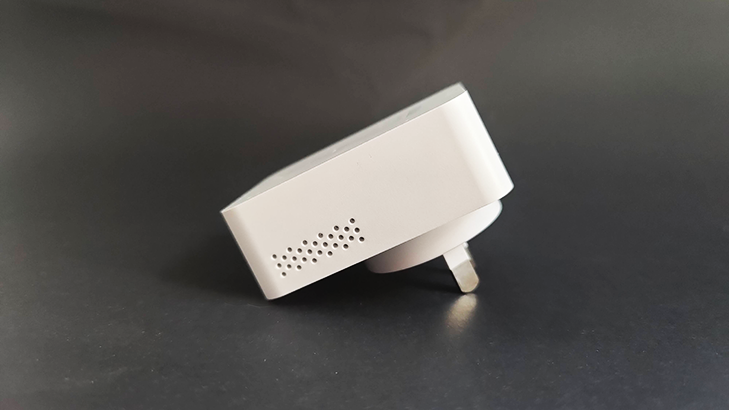
It’s impossible to fault the D-Link AV2 Ethernet powerline adapter. Set up took a grand total of five minutes from box to connection. Simply plug in the first adapter to a socket by your modem/router and connect it with the included Ethernet cable, then plug in your second adapter to a socket near your chosen device and connect the two with the other Ethernet cable in the box.
That was literally all it took to be up and running with the PS4 directly connected to my household internet connection.
Practically speaking the D-Link AV2 was a huge success. In tests before the adapter the PS4 was achieving download speeds of 29.1Mbps and uploads of 6.5Mbps, after connecting the speeds shot up to 38.7Mbps down and 8.5Mbps up.
When connecting the adapter to my laptop my speeds went from 34Mbps down and 16.29Mbps up, to 93.46Mbps down and 38.73Mbps up. Regardless as to which power point I plugged into the results were within a 3Mbps variant up or down, which is impressive no matter how you look at it.
These drastic speed increases speak for themselves, and it was so simple to set up that there’s really no downside.
If I had to nit pick, it would be nice to be able to plug in multiple devices through an extra port but it’s very much a ‘nice-to-have’ concept. Sure it would be great to add the smart TV directly to the network and leave the WiFi free for other devices but it’s just a minor point that would have served my exact circumstance if it was available.
If you’re in a similar situation and really just need some extra juice for one part of your network, I couldn’t recommend the D-Link AV2 highly enough.
Anula Wiwatowska
Offsite Editorial Lead | Instagram

Find a better internet plan
Thousands of internet plans unpacked. All the facts. No surprises.

Related Articles


Internet Plans by State
- Internet Plans in ACT
- Internet Plans in NSW
- Internet Plans in NT
- Internet Plans in QLD
- Internet Plans in SA
- Internet Plans in TAS
- Internet Plans in VIC
- Internet Plans in WA


![[Hand-Picked] Best internet providers in Australia](https://r3.whistleout.com.au/public/images/articles/2026/07/man-and-woman-with-laptop-on-green-couch.jpg?w=280&h=280&usm=20&usmrad=0.8&fit=crop "[Hand-Picked] Best internet providers in Australia")

