

Whether you're looking to set up a smart home, or are down for some hands-free help around the house, then Google Nest might be what you're looking for.
Starting your smart home begins with the decision of which ecosystem is right for you. Google's Nest and Home devices are just one of the top options in the Australian market. If you're not quite ready to dive into a smart home, then the Nest smart speakers make a great addition to any home.
In this guide:
- What’s a smart home ecosystem?
- Google Nest or Google Home?
- What is Google Assistant?
- Google Nest Range
- Google smart home hubs
- Do I need a fast internet connection to use my Google Nest?
- NBN Plans
- Compatible devices
- Pairing devices
- What can Google Assistant do?
What’s a smart home ecosystem?
Earth’s various ecosystems are created as different organisms interact within their physical environment. The balance comes when every creature lives to serve a purpose in perpetuating the circle of life and growth within that environment.
A smart home ecosystem works in the same way, with various smart devices and cloud services all united to manage a home together.
Google Nest or Google Home?
Google Nest and Google Home are the search giant's range of smart speakers. Nest is the newer tech, but both these and the Home range offer the same Google Assistant experience. Some of the Home range has already been phased out in lieu of their Nest counterparts, but others are still available.
With the Assistant built-in, each device from Google can carry out the same tasks - the differences lie in the speakers, screen choices, and small additions such as a camera on the Nest Hub Max.
Since every device has the capability to use voice commands and control smart devices, choosing your Google device will depend on the size of the space you're hoping to cover and of course your budget.
What is Google Assistant?
Google Assistant is exactly that, Google's virtual assistant. Virtual assistants are a form of Artificial Intelligence, which mimics real conversation while carrying out commands and tasks when prompted via voice control.
When you say the wake word, “Ok Google” or "Hey Google" you are telling that service to start listening to your voice and follow through with your commands.
When it was first launched, the platform was an extension of Google's voice control software Google Now. This version used to pull important information about you like, where you work and your favourite sports teams in order to personalise your Google experience. While Google Now is now dead, it lives on in a more intelligent form.
While Google Assistant isn't as conversational as say Amazon's Alexa, the tech does its job to put you at ease with your new robot friend.
Google Nest Range
 |
 |
 |
 |
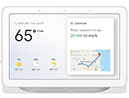 |
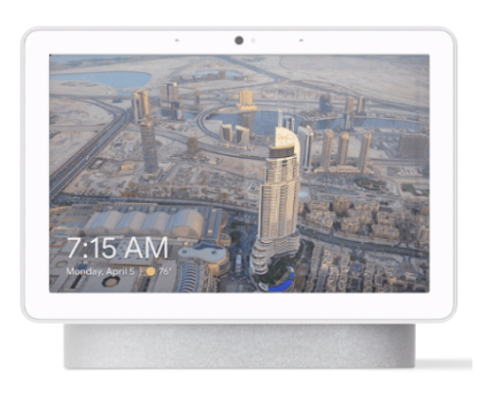 | |
| Google Home Mini | Google Nest Mini | Google Home | Google Home Max |
Google Nest Hub | Google Nest Hub Max |
|
| Price | From $79.00 |
From $79.00 |
From $149.00 |
From $399.00 |
From $199.00 |
From $349.00 |
|---|---|---|---|---|---|---|
| Google Assistant Built In |  |
|
|
|
|
|
| Speakers | 360 sound with 40mm driver | 360 sound with 40mm driver | 2" driver and dual 2" passive radiators | Two 114mm dual voice coil woofers two 18mm tweeters | Full range speaker | Two 18mm tweeters, one 75mm woofer |
| Smart Sound |  |
|
|
|
|
|
| Touch Screen | |
|
|
|
7" LCD | 10" HD |
Are all Google Nests smart home hubs?
All Google Nest and Home devices are smart home hubs. Regardless of whether you're using the Mini or the Max, you will be able to connect your compatible devices directly through your Google Home app.
The caveat however, is that this is only true when using compatible devices. The range is not unimpressive, but it is somewhat limited when you compare it to other smart home ecosystems. More on that later.
Do I need a fast internet connection to use my Nest?
Connection speeds required are determined by what you use your smart speaker for. The more you add to your ecosystem, the more bandwidth you will need in order to support your smart home.
Basic functions like playing music will use around 2Mbps, and home assistants like Google Assistant only use about 1 to 2Mbps when they are active. The basic rule of thumb for determining the speed you need to support your smart home is to add 5Mbps on top of your usual speed.
In most cases, your Google Nest device will work perfectly on your current NBN plan. But if you’re not happy with your internet or you're planning a big smart home haul, we’ve put together some recommendations.
NBN Plans
NBN 50 (Standard Plus) Plans
|
#1
|
Dodo 
|
|
|
#2
|
amaysim 
|
|
|
#3
|
Tangerine Telecom 
|
|
|
#4
|
TPG 
|
Link not supplied
|
|
#5
|
Aussie Broadband 
|
Link not supplied
|
|
#6
|
Superloop 
|
|
|
#7
|
Belong 
|
|
|
#8
|
iiNet 
|
Link not supplied
|
|
#9
|
Kogan Internet 
|
|
|
#10
|
Flip 
|


NBN 100 (Premium) Plans
|
#1
|
Dodo
|
|
|
#2
|
amaysim
|
|
|
#3
|
Superloop
|
|
|
#4
|
iiNet
|
Link not supplied
|
|
#5
|
Tangerine Telecom
|
|
|
#6
|
TPG
|
Link not supplied
|
|
#7
|
Belong
|
|
|
#8
|
Kogan Internet
|
|
|
#9
|
Moose NBN 
|
Link not supplied
|
|
#10
|
Origin Broadband 
|
Link not supplied
|


What devices are compatible with Google Nest?
Google devices are compatible with over 5,000 devices from more than 400 brands. Those numbers are pretty good, but it doesn't compare with other systems like Amazon's Alexa.
In saying that, 400 brands is nothing to scoff at, and realistically you're probably not going to need 5,000 devices different connected to your smart home hub. Google's chosen brands won't necessarily set you back top dollar either, you can even get compatible appliances from Ikea.
Listing 400 brands here would probably be overkill, but we can get you started with some of our favourites for smart lighting, adaptors, and home security.

Mirabella
Look at its smart power outlet adapters

Ikea
Check out its lighting solutions
Philips Hue
See its smart bulbs range
Arlo
Best for
home security systems
Pairing smart home devices with Google Nest
Pairing devices with Google is easy through the Google Home app. Simple tap the + in the top left corner and go to set up device. The app walks you through the process, discovering devices near by and letting you place them in certain rooms throughout your Home.
This makes creating room specific voice commands like "turn on living room lights" easy as. The downside however is that it's rare (in my experience) for Google to find the device on the first go.
Once everything is set up, the Google Home master screen is sleek and minimalist, making it incredibly user friendly.
What can Google Assistant do?
If we were to list everything that Google Assistant can do, you’d get carpal tunnel from scrolling. Google's so called, Actions are constantly expanding with more added each day. To use these actions, you won't need to activate them anywhere but you will need to have the connected apps or devices for certain commands.
Scrolling through Google, there are literally thousands of skills you can access. Here are some of our favourites:
Games and Fun
OK Google, tell me a joke
Hey Google, what was your childhood like?
OK Google, drop a beat for me
Health and Fitness
Hey Google, track my run
OK Google, play white noise sounds
Hey Google, ask sleep tracker how well I slept
Food and Drink
OK Google, ask Domino's Australia to order my usual
Hey Google, talk to Wine Master
Music and Audio
Hey Google, talk to Michael saying no
OK Google, sing me to sleep
Business and Finance
OK Google, ask AGL for my energy insights
Hey Google, give me Optus
Travel and Transport
Hey Google, show me directions to...
OK Google, ask Bike Hunt about Lime bikes
Kids
Hey Google, tell me a bedtime story
News
OK Google, tell me something else good
Anula Wiwatowska
Offsite Editorial Lead | Instagram

Find a better internet plan
Thousands of internet plans unpacked. All the facts. No surprises.

Related Articles


Related Topics
Google smart home smart bulbPopular Topics
NBN Telstra Optus Streaming Internet Broadband smart home 5G Foxtel modemInternet Plans by State
- Internet Plans in ACT
- Internet Plans in NSW
- Internet Plans in NT
- Internet Plans in QLD
- Internet Plans in SA
- Internet Plans in TAS
- Internet Plans in VIC
- Internet Plans in WA


![[Hand-Picked] Best internet providers in Australia](https://r3.whistleout.com.au/public/images/articles/2026/07/man-and-woman-with-laptop-on-green-couch.jpg?w=280&h=280&usm=20&usmrad=0.8&fit=crop "[Hand-Picked] Best internet providers in Australia")

