

Huawei Watch GT 3 Review: The Verdict
It has been a long time coming, but Huawei wearables can finally offer you the same experience on Android and iOS. Knowing that anyone can pick up the GT 3 and have great connectivity, a stunning display, and full access to everything Huawei Health has to offer, I’m ready to recommend it to friends.
What we love
- Stellar battery life
- Gorgeous display
- It just works (finally)
What could be improved
- No NFC
- Can't connect streaming apps
- Calorie tracking doesn't align with other wearables
85/100
If you can say one thing about Huawei wearables over the past two years is that they’ve been consistent, but the Huawei Watch GT 3 has broken that consistency, and that's a good thing.
Every Huawei wearable I have used over the past two years has had limited connectivity with Android and Apple products, you’d have to sideload apps and updates to Android devices, and set-up was generally arduous.
The complicated procedures for using a Huawei watch without a Huawei phone have held me back from wholeheartedly recommending watches in the past, but now that has changed.
Connecting...
Huawei is still recovering from the fallout of a US executive order that cut it off from Google and Android in the process. Since this decision went through in May 2019, Huawei had to double down on creating its own apps and ecosystem without the help of Google applications. Any app that uses Google systems as a base still won’t work with newer Huawei phones, so that is one way to cut out UberEats if it is becoming a problem.
These issues have previously overflowed into wearables, especially if you were hoping to pair a Huawei watch with an Android phone. For a while you couldn’t download the Huawei Health app from Google Play at all, and you needed to sideload it straight from the website. While it wasn’t necessarily difficult to do, it just felt dodgy. Getting a pop-up on your phone warning you about a download is unnerving. Now, however, you can simply download Huawei Health directly from Google Play, but note that you may still need to update firmware through Huawei’s official website.
Previous iterations of the iOS app have also had limited connectivity. A couple of years ago I reviewed the Huawei GT 2e and the iOS app was severely watered down. Now there is full functionality across both Android and Apple devices, although I have found that the GT 3 does take a hot minute to reconnect to my phone if I haven’t opened the app in a while. Most mornings i’ll need to open up Huawei Health to trigger it to reconnect and start sending me notifications again.
Despite this small inconvenience, I'm finally comfortable enough to start recommending Huawei wearables across ecosystems.
A couple of connectivity caveats though. Firstly there is still no NFC in the GT 3 so you won’t be able to tap and pay with your watch, and secondly, you can’t control your music apps directly through the wearable. Where most smartwatches pick up when you’re playing music on your connected phone, and let you see and control your tunes from your wrist, the GT 3 doesn’t have this functionality. There is a music app available on the wearable, but it ultimately turns your watch into a fancy MP3 player.
Just like the ole’ days, you can add MP3s onto your watch and listen through any wireless headphones. For me this wasn’t a useful feature because I haven’t listened to music outside of a streaming service, or vinyl in close to a decade, but if you still buy and download music then you can leave your phone at home if you go for a run.
Hey look, it’s a round Apple Watch
Imitation is the highest form of flattery, so I wouldn’t be surprised to see Apple blushing over the new grid design on the Huawei GT 3.
The two app organisation designs are nearly identical, although the grid is a bit strange to see on a circular Huawei display as opposed to Apple’s squared off watch, especially when you zoom all the way out. It is however easy to navigate, as is the rest of the GT 3.
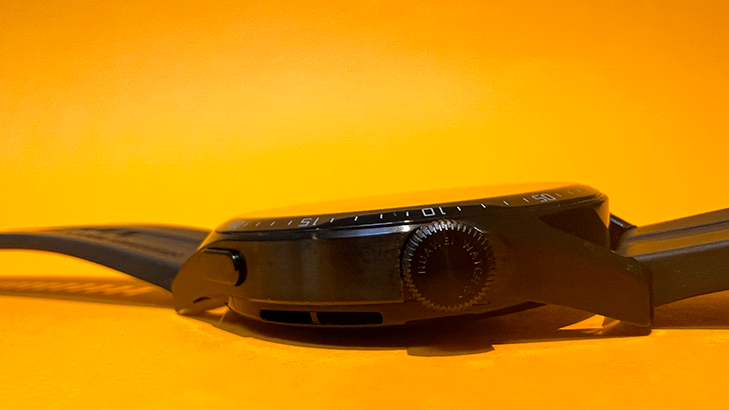
You can use a combination of the touch screen, the crown, or the button on the side of the watch in order to navigate through the tiles and applications. However you choose to scroll through the watch, it responds quickly with pleasing animations across a gorgeous screen. Each tile is absolutely stunning as well, I’m more than a bit enamoured with the daily moon phase tile.
Considering just how animated, and vibrant the display is you’d be within your rights to worry about battery life, but you’d be wrong.
Outwit, Outlast, Outplay
Big, beautiful displays generally drain power quickly no matter the device, but even with the stunning screen the GT 3 has incredible battery life.
According to Huawei the 46mm variant can last up to 14 days between charges. Realistically you’re not going to get 14 days of full on usage out of the GT 3, but you will get around eight. That is eight days of workouts, GPS tracking, notifications, and staring into the moon phases tile, with no battery saving options utilised. As far as smartwatches go, that puts the GT 3 46mm in the upper echelon for battery. The Suunto 9 Peak comes to market with a similar battery promise, but in testing we found that it lasted about five days. It isn’t anything to scoff at, but the 9 Peak sacrificed its screen resolution to get there, where Huawei hasn’t.
While I’m comparing Huawei to Suunto, it is worth noting the GT 3 is more frugal when it comes to calorie count. Compared to other trackers - the 9 Peak included - the Huawei GT 3 is far more restrained when calculating calories burned. In my testing, the Huawei consistently gave me around 30% less calories burned on the same workout as the Suunto 9 Peak. Both showed the same heart rate, the same workout duration, and my weight and height were consistent across both devices, but regardless the output was significantly different.
Whether the GT 3 is more or less accurate than other trackers, I can’t say, but the caloric result is inconsistent enough to raise an eyebrow. I can say that the Huawei watch picks up changes in heart rate faster than other watches I've used. If you look at the charts below on Huawei Health (left) vs Suunto App (right), you can see that Huawei shows more nuance between heart rate fluctuations. It could very well be this sensitivity that accounts for the prudent calorie counts, but either way you should only ever use a smartwatch as an indicator of calories burned.

Huawei Watch GT 3 - Final thoughts
Huawei has been making incredible hardware for years, but it just hasn’t quite worked with every device. With these compatibility issues a thing of the past, the Huawei GT 3 is a smartwatch that I would recommend for most people. The detailed tracking, mixed with the multitude of exercise tracking modes, makes it worth considering for fitness enthusiasts, while the stunning display makes it an excellent supplementary device to your smartphone for anyone less fitness and more focus inclined.
Anula Wiwatowska
Offsite Editorial Lead | Instagram

Related Articles


