

Amazon Echo Studio Review: The Verdict
The Amazon Echo Studio cranks as a speaker and is super responsive as a smart home hub. Alexa, tell Google I’m sorry, but she’s been replaced.
What we love
- Loud enough to cover your thoughts
- Sound quality
- Wide range
- Responsive AF
What could be better
- She's heavy
- Not great portability
- Streaming app compatibility
- The cost
90/100
First Impressions
When I got my hands on the Echo Studio I was skeptical. It is bulky, heavy and I just couldn’t forsee a time when I would need something like this in my (admittedly spread out) 2 bedroom apartment. Plus, I’m fiercely Team Google - to the point that the Apple v. Android argument accounts for 80% of me and my husband’s fights. Turns out that I was wrong (about Alexa, not Apple) and now I don’t want to give her back.
I’ve got two floors at home, with two balconies on complete opposite ends of the house. I live in what can only be described as chaotic evil as we battle for supremacy with the JBL upstairs, and the soundbar downstairs, all the while trying to give Google commands over the noise. The Studio has managed to silence the turmoil and return my household to it’s true state - chaotic neutral.The Basics
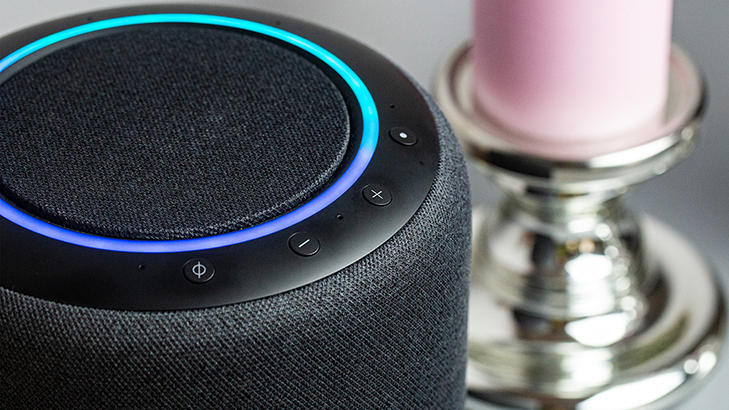
The Studio is the top of the range of Amazon’s smart speaker range - with 5 speakers, Dolby Atmos 3D audio, and built-in Alexa and Zigbee smart home hub.
The cylindrical Studio comes in at about 20cm x 17cm, which is about the size of a small watermelon. Meaning it's big, but not too big to sit on a table. But, you’ll want to put it on something stable with it weighing in at a whopping 3.5kg.
There’s no built-in battery and the Studio needs a constant power source, which is a bit of a bummer but also nothing new for a smart home hub - still, it is a disappointing realisation if you’re only in the market for a speaker.
The Bluetooth connectivity is close to universal, with the only exceptions being Mac OS X devices and speakers that need you to enter a PIN to connect. If Bluetooth isn’t your cup of tea, then this probably isn’t the speaker for you, but you can always connect using a 3.5mm/mini-optical line.
Echo Studio as a speaker
As I held the box in my hands, I was wondering why on earth I would want a smart speaker that wasn’t portable. I’ve got four speakers - all chargeable, travel friendly and pack a punch sound-wise. With so many viable, and significantly cheaper options, my initial thoughts on the Studio as a speaker was a resounding, “but why?”
Looking at it as more of a permanent fixture, it's impressive. During set up, the speaker analyses the acoustics in the room - which for me is our open-plan kitchen and lounge - and optimises the sound for that space. The skeptic in me immediately called BS and had to compare the settings in different rooms.
Sure enough, moving it upstairs into a smaller, carpeted space, the sound quality and the 3D sound shifted dramatically. It wasn’t bad, just not as good. After a quick reset and letting Alexa assess the acoustics of the new room, there was a HUGE change and it was back to the original quality. BS, evaded.
Sound Quality
I can’t fault the sound quality. Whether connected via Bluetooth, using line-in or through Amazon Music - the sound is crisp, clear, and resonates through the house.
There’s no quality change with increased volume either. Whether I had it set to one for ambient background noise, or blasted it to ten, the sound came through undistorted. It has been a lovely change from my good ole' Google Home, who would get crackly if you turned the volume higher than six.
Pet Peeves - 3D Audio loses some dimension
The 3D sound is one of the features that makes the Echo Studio such a high-end product. The idea is that you get the surround sound experience from the one speaker, adding space, clarity and depth to the track. It’s a shame that it’s not quite there yet though.
Most of the time it works, but it’s just not a seamless experience. Exploring Amazon Music HD, I got a feel for what they were trying to do but the difference was, at times wholly unnoticeable and at others, far too prominent.
Echo Studio as a smart home hub
I'm so convinced by the Studio that I just need to do one thing before we continue...
A breakup note to my Google Assistant
Hey Google,
I’m sorry, but this is the end. I had to write this down, because frankly your hearing isn’t what it used to be and I’m worried about how you will respond. I’ve found someone new - she’s younger and she’s got a bit more junk in the trunk. But don’t think this is just a superficial connection. She gets me. She listens, and the conversation… Well it flows better with her then it ever did between you and I. I can’t say I won’t miss you. You’re funnier than she is, with a sharper wit and a wiser mind.
But you have to know when it’s time to say goodbye.
So, goodbye Google.
Okay, now that that's out of the way, it's time to rebound right into it.
Connecting my devices to the Studio was entirely painless, to the point of being actually exciting. Commands that used to lag (exes, amirite?), are now close to instantaneous. My Deebot and soundbar were hooked up in the span of five minutes, which is saying something since neither of them are optimised for the Alexa platform.
Another nice thing about Amazon, is the transparency within the Alexa app. When I got my Google Home Hub, I was a smart home newbie and had to Google what the device could actually do. Googling "Google" didn't break the internet, but it damn near broke me. But with Alexa, all her skills are spelled out in neat little categories.
The functionality is there, with commands for everything ranging from smart home, to entertainment, all the way through to easter eggs that are not-so hidden from the user.
Connecting Devices
“Alexa, discover my device.”
That pretty much sums up the process. I'm not using hyperbole - it was actually that easy for me.
Responsiveness
Unlike my previous love, Google, Alexa is quick off the mark to listen and respond. Answers and actions come immediately, as opposed to after the 3-4 second delay I have become accustomed to.
Not only that, but the range is impressive. I can be upstairs, speaking normally and Alexa will pick up a command. No more yelling into the abyss to find out the weather.
Pet Peeves - Compatibility with streaming services
Amazon Music and IHeartRadio work a treat, but using Spotify through the system is pretty disappointing. I had hoped that the compatibility would be similar to the Google Home Hub, but it is touch and go at best.
You need to specifically ask Alexa to play a tune through Spotify, and it took a few gos for her to actually find it. Trying to get one of my playlists going was even more of an ordeal and I ended up shrugging my shoulders and just going with Amazon Music.
I hate not being able to pick up where I left off when I get home. With Google Home, I take off my headphones and my podcast would be perfectly timed and connected to the speakers so I can keep listening without missing a step. So that’s one point to Google. These issues are pretty common, with the Spotify skill getting a horrendously low rating of 3-stars. Here's hoping an update fixes this soon.
Who is the Amazon Echo Studio for?
The Echo Studio is a slick, intuitive smart speaker that completely blows the competition out of the water. It can do everything it’s counterparts can do, and in most cases she does them better and faster. In saying that, it might be a bit too much depending on your space and budget.
At $329, it’s on the pricier side if you’re only in the market for a speaker. There are definitely options out there for a lower price that give the same results. At the same time, if you’re living in a one bedroom or don’t need something that could potentially break the sound barrier, then you may be better off looking at the Studio’s younger sister, Echo Plus.
If however, you’re in the market for a smart home hub, that just happens to have outstanding sound quality then the Studio is for you. She's undeniably for me.
Anula Wiwatowska
Offsite Editorial Lead | Instagram

Find a better internet plan
Thousands of internet plans unpacked. All the facts. No surprises.

Related Articles


Internet Plans by State
- Internet Plans in ACT
- Internet Plans in NSW
- Internet Plans in NT
- Internet Plans in QLD
- Internet Plans in SA
- Internet Plans in TAS
- Internet Plans in VIC
- Internet Plans in WA


![[Hand-Picked] Best internet providers in Australia](https://r3.whistleout.com.au/public/images/articles/2026/07/man-and-woman-with-laptop-on-green-couch.jpg?w=280&h=280&usm=20&usmrad=0.8&fit=crop "[Hand-Picked] Best internet providers in Australia")

