
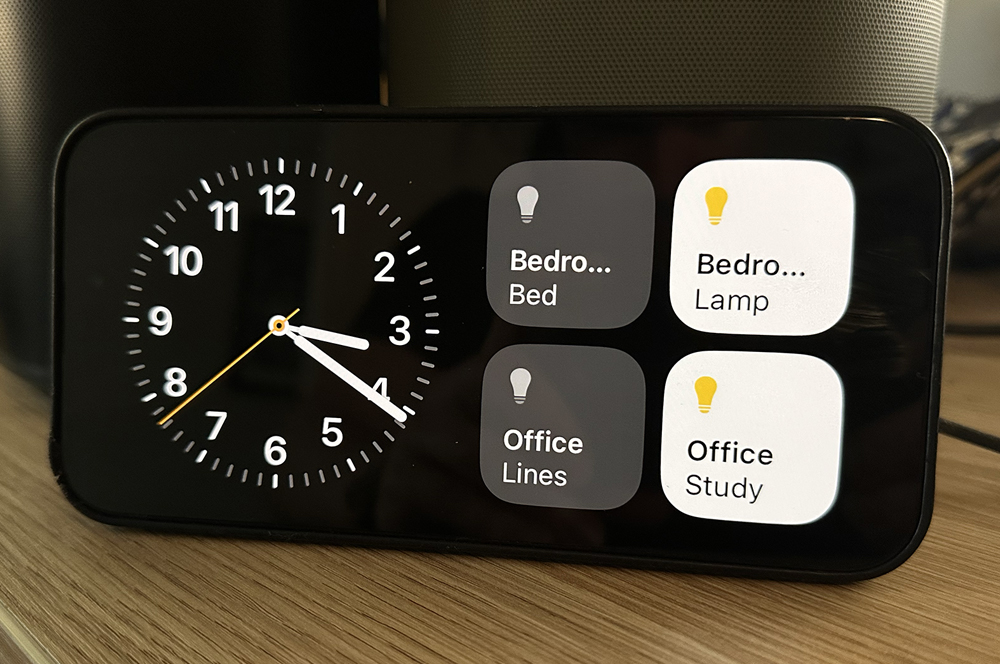
iOS 17 brings with it a handful of useful new features, but there's a bigger overarching theme. Apple is giving you more reasons to hold onto your old iPhone when you upgrade, rather than handing it down, trading it in, or pawning it on Facebook Marketplace.
To start, there's StandBy. When your iPhone is charging and sitting upright in landscape, it effectively becomes a smart display. The functionality is basic but neat. You can interact with smart home devices, see your calendars, reminders, and so forth. It makes the iPhone the closest thing Apple has to an Echo Show.
It's also not how I want to passively use my iPhone. StandBy is neat, but my lock screen gives me more glanceable information, and I can access widgets and smart home controls more efficiently than with a docked device.
StandBy is cute, but it makes more sense on a device you're not constantly interacting with. It's a shame you currently only get the always-on functionality with an iPhone 14 Pro or iPhone 14 Pro Max, because I'd definitely turn an old iPhone into a little StandBy hub. (iPhone 15 Pro and iPhone 15 Pro Max will have always-on displays when you're released on Friday.)
Apple has also built on the continuity camera functionality it introduced last year by expanding it to Apple TV. Continuity camera effectively lets you use your iPhone as a webcam for your Mac, and now it can do the same for Apple TV.
When I've tested continuity camera on Mac, it definitely offered an improvement in video quality compared to the webcams you tend to find in a Mac. At the same time, losing access to my phone for that time is kinda annoying.
What's even more interesting is functionality that Apple has been comparatively quiet about. iOS 17 includes a new development framework that can turn an iPhone into a pet-tracking camera when combined with a motorised phone stand.
This isn't a feature in iOS 17 itself, but under-the-hood tech that allows third-party developers to create iPhone-powered pet cams. Either way, it's presumably the kind of feature that you'd be using when you're not at home. There's no way you're leaving your iPhone at home, so you'd need a second iPhone to use it as a pet cam.
This slate of functionality is interesting, given the increased emphasis we've seen on trading in your old iPhone when you get a new one, from both Apple as well as the telco industry. Recycling old phones and reusing materials to make new devices is a big part of Apple's for its devices to be carbon neutral by 2030. At the same time, I guess upcycling your old phone into a smart home hub or a pet camera is its own form of upcycling.
Alex Choros

Related Articles


