

As part of its 2019 Developer Conference, Huawei detailed a number of changes coming tto take on Android used by its smartphones, EMUI.
One of the most significant UI overhauls coming to the EMUI 10 update is what Huawei calls magazine layout design philosophy. Huawei's first-party apps will get the magazine treatment, particularly content-specific apps, like Gallery.
The redesign leans on the old-school principles of print, such as grid layout and white space, to highlight the most important details in a page. For example, apps such as Contacts will have more emphasis on the page title (e.g. "Contacts”) with more white space around sub-headings (contact names), and body text for the finer details (contact number, email, et al).
The magazine layout was designed with two primary aims; improving readability/balancing reading habits and one-handed usage.
We only got a quick glimpse at a few redesigned apps, such as Contacts, Notepad, and Gallery. At first glance, the magazine layout seemed to waste a lot of screen real estate but the additional white space and off-white background was easy on the eyes.
Below is a photo comparing the Gallery app on EMUI 9 (left) to the Gallery app on EMUI 10 (with dark mode active).

Dandy Morandi colour palette
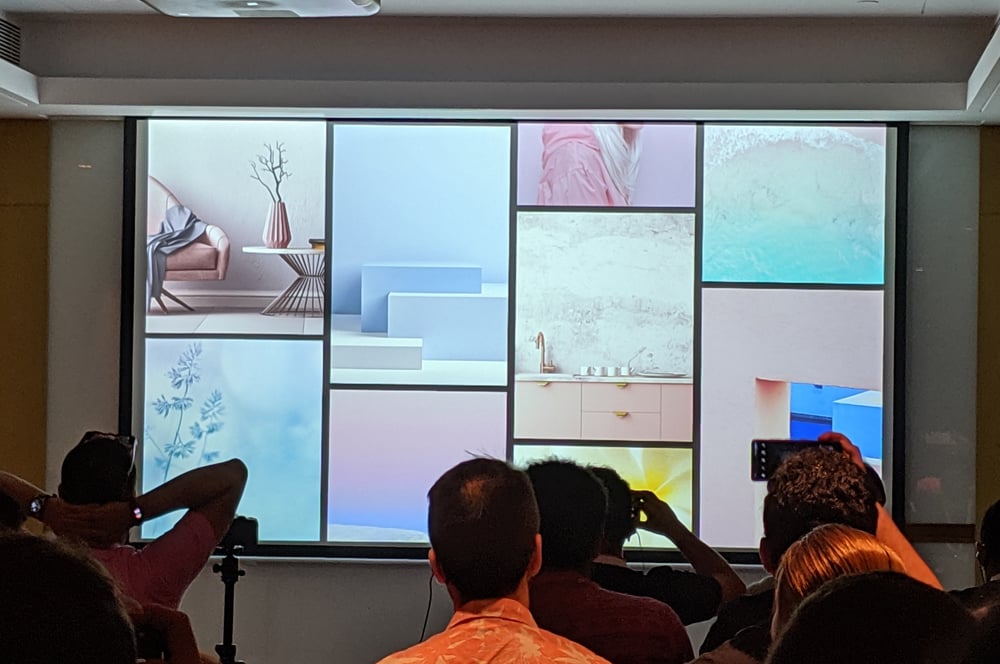
The EMUI 10 user interface takes inspiration from still life artist Giorgio Morandi with its low-saturation colour palette of pale pastel pinks and blues. For large blocks and elements, colours are low-saturation to give a premium feel, but smaller elements, such as app icons, are high-saturation for ease-of-use and readability.
Huawei says Morandi colours are meant to invoke a peaceful, comfortable feel.
Always on, always changing
When EMUI 10 rolls out, the Always On Display will change brightness and colour at different times of the day.
Past implementations of Huawei's Always On Display have been primarily designed with low-power usage in mind so the brightness is muted at all times of the day, and difficult to read in certain lights.
In EMUI 10, the Always On Display will brighten during the day to improve visibility, and illuminate with a subtle neon glow at night to set the mood.
Adaptive app icons and imposing night mode
With the launch of EMUI 10, Huawei’s first-party app icons are all getting a fresh lick of paint.
Huawei is using the “Golden Ratio” mathematic ratio as its guiding design principle. All first-party apps will be redesigned with this in mind but third-party apps will also be adapted to fit the look and feel of EMUI 10's redesign. Users will also have the option to select the shape of individual app icons (e.g. circle or square) if they prefer one style over the other for particular apps or folders, rather than applying one choice to the entire app drawer.

With EMUI 10, Huawei is also reworking its dark mode feature.
Dark mode options have become a bit of a hot topic in the last year, with most major apps and services slowly rolling out their own sleep-friendly display options. But not every app is up with the times and getting dark mode right isn’t about simply inverting the colours on the display. With EMUI 10, Huawei is putting thought into what users need from a dark mode. It boils down to two things: legibility and comfort.
To get it right, Huawei’s dark mode has four levels of luminance to deploy for different scenarios (e.g. app design and external lighting). Huawei is also imposing its night mode on third-party apps; so even if your favourite apps don’t have their own dark mode, EMUI 10 will convert them for you. Apps that are forced into dark mode will retain their brand colours but EMUI 10 adjusts their brightness and hue levels to fit with its own dark mode standards.
Huawei will also be a providing an open dark mode API for any third-party developer interested in including support for their feature in its apps.
Other features coming to EMUI 10
While the devices on-hand at the Huawei Developer Conference didn’t have the full suite of changes coming in EMUI 10 ready, we did catch a glimpse at a few added bonuses Huawei users will see when the update becomes widely available.
Most notable was “Multi-screen Collaboration”. With EMUI 10, Huawei users will be able to mirror their entire phone displays to their PC display. Users will be able to access most of their phone's features from the mirrored display and send texts, makes calls, and more, directly from their computer.

Huawei is also making a few tweaks to its camera app, with a red dot highlighting the active mode, and brighter, bolder text on camera mode options. Haptic feedback is being added for when you switch shooting modes, which will come in handy for someone like me who’s always managing to flick to panorama or video when they just want to take a quick snap.
Lastly, there’s one simple change for anyone who appreciates a bit of convenience and organisation. The Settings page in EMUI 10 will push the most frequently used settings pages (e.g. Wi-Fi and Bluetooth) to the top of the list and group together setting types (e.g. Visual settings like Display and Homescreen & Wallpaper) between dividers.
When will I be able to download EMUI 10?
The EMUI 10 public beta will be available to Huawei P30 Pro owners from September 8, but it will also be on the standard P30, the Mate 20, and the Mate 20 Pro. It was suggested that other existing Huawei phones will get the update, but we can’t say for sure which models are eligible just yet.
WhistleOut travelled to China for the Huawei Developer Conference as a guest of Huawei
Brodie Fogg
Managing Editor - Streaming

Related Articles


