
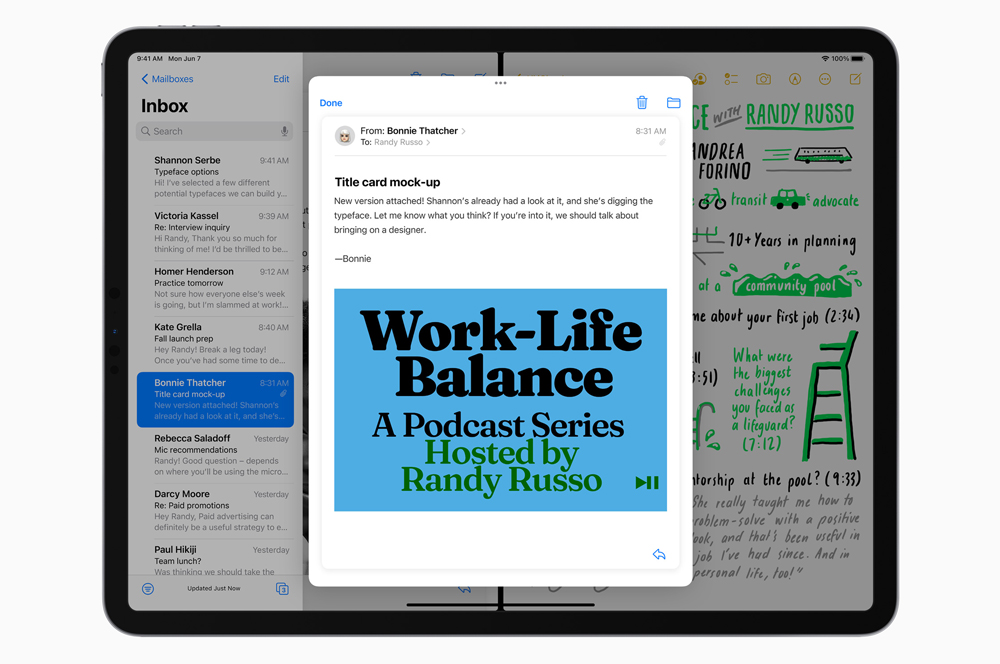
Apple today announced the latest version of its iPad operating system, iPadOS 15. While the update shares a lot of its new functionality with iOS 15, it has a few major changes focused on productivity and multitasking. These include new multitasking UI elements, Quick Note, and extended widget support. Here's a look at the major new features.
Multitasking should be better
The biggest changes related to multitasking revolve around new design elements; tapping the top of your iPad reveals a multitasking menu which makes opening a second app faster. You don't need to drag and drop anymore. Swiping down on either app you've got open will bring back the home screen and let you replace it. You can also create split views in the App Switcher.
In certain apps, you'll be able to touch and hold elements - like an individual email in Mail - to open them floating above both of your apps.
Apps will feature a new element called the shelf, which lets you view all the windows you have open for an individual app and jump between them - even if they include split views.
We'll be especially keen to check out these changes, as multitasking was something we found clunky in our recent review of the new iPad Pro.
Quick Note for, well, quick notes
If you just need to jot down something without leaving your current app, iPadOS 15 features a system-wide note app that you can fire up whenever via keyboard shortcut, via the Control Centre, or from a swipe up from the corner of the screen with either your finger or the Apple Pencil. These can include handwriting, links, and Safari highlights.
In addition, the Notes app now supports # tags and @ mentions.
Widgets, and App Libraries, and oh my
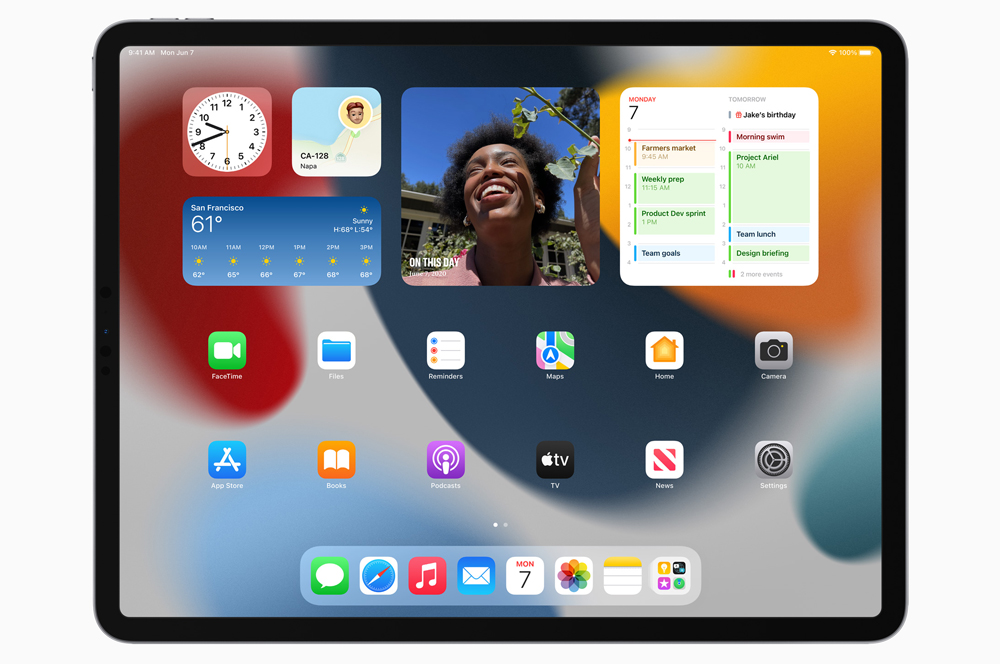
iPadOS 15 brings some of iOS 14's best features to Apple's tablets. You'll finally be able to place widgets anywhere on your home screen, just like an iPhone. Thanks to the bigger screen, iPad widgets also come in a larger size to highlight more content.
In addition, you'll be able to hide apps from your home screen, and jump into the App Library to view the full set. The iPadOS 15 also features a quick shortcut to the App Library, so you don't have to swipe across a billion home screens to get to it.
Finally build apps on your iPad
Swift Playgrounds, Apple's iPad-centric learn-to-code app is becoming a lot more powerful, to the point where you'll finally be able to build apps on the device itself. These can even be submitted directly to the App Store, without the need for a Mac.
Two devices, one keyboard
If you're deep in the Apple ecosystem, you'll be able to use a single keyboard and mouse to control both your iPad and a Mac. You can even drag and drop from your iPad to your Mac and vice versa.
iOS 15 features
iPadOS 15 also includes the new features coming to iOS 15, such as a FaceTime overhaul, Focus modes, Live Text, a redesigned Weather app, and more. Read more about what's new in iOS 15 here.
Can I update to iPadOS 15?
iPadOS 15 will be compatible with every iPad already running iPadOS 14. This includes all 12.9-inch iPad Pro models, all 11-inch iPad Pro models, the 10.5-inch iPad Pro, the 9.7-inch iPad Pro, the 5th, 6th, and 7th generation iPad, the 5th generation iPad mini, iPad mini 4, the 3rd and 4th generation iPad Air, and the iPad Air 2. Apple hasn't dropped support for any iPads this time around.
When will iPadOS 15 be available?
We're expecting to see the final version of iPadOS 15 available in September. A developer beta will be available from today, with a public beta scheduled for July.
Alex Choros


