

After months in beta, Apple's new iPhone operating system - iOS 14 - is almost available to iPhone owners. Key new features include a redesigned home screen featuring widgets, stripped down version of apps known as App Clips, a redesigned take on Siri, and updated Messages functionality for group chats.
The download should be just under 5GB, although this may vary from device to device. While you wait for the update to drop, here's a more detailed look at what's new.
Widgets on the home screen
One of the biggest changes in iOS 14 is the ability to put widgets directly on your home screen. While iOS widgets have been available in the Today view when you swipe to the left of your home screen for quite some time now, these can now be dragged to your home screen.
Widgets will be available in multiple sizes, so you can pick out how much info you want to display. Apps such as the Calendar, the Apple Watch Fitness app, Photos, Reminders, World Clock, and Notes all support widgets.
iOS 14 also features a Smart Stack widget that can display context sensitive widgets based on the time of day. It might be a News briefing in the morning, your Calendar during the day, and your Apple Watch progress at night.
App Library

App Library is a new space at the end of your home screen designed to address the issue with people having too many pages of apps on their iPhones. Instead of just adding an endless amount of pages to your home screen, App Library is a streamlined view of the apps you have on your phone.
App Library automatically groups apps to try and help you find what you're after. At the top, there's suggestion based on frequently used and recently added apps. These are followed by intelligently curated categories such as Apple Arcade and entertainment. There's also a list view, and integrated search.
In the same vein, iOS 14 lets you turned off unused pages on your home screen, so you can get to App Library quicker.
App Clips

Sick of downloading an app for absolutely everything? App Clips is the solution to this. Instead of installing a standalone app for tasks you might need quickly - such as a hiring an electric scooter, paying for a parking, or coffee shop loyalty - you'll be able to fire up a stripped down version pitched as "the part of the app you need, when you need it".
App Clips will have Apple Pay for payment, and Apple ID for sign-in to further streamline the process.
App Clips can be accessed from Maps, NFC tags, QR codes, from message, and from the web.
App Clips are less than 10MB in size to ensure they launch quickly.
Third-party default apps
In iOS 14, you'll be able to replace Safari and Mail with your own preferred third-party browser or email app as a system-wide default.
Picture-in-picture video
Picture-in-picture video has been available on iPad for quite some time, but it's now also coming to iPhone. Video will automatically swap into picture-in-picture mode when you swipe out of what you're watching. You can then resize your video, and reposition it as it floats over your other apps. You're also able to drag your video off the side of the screen to hide the footage, while keeping audio going.
Siri redesign

Siri is a whole lot more streamline in iOS 14; instead of taking of your entire screen, Siri appears as a small overlay at the bottom of your screen and results are presented in a notification shade.
In addition, Siri can now send audio messages, and dictation is coming to the iPhone keyboard.
Translate
Apple is bringing its own translation app to iOS 14, based around conversations. You'll be able to enter text or speak phrases and have them translated into 11 languages. At launch, English, Mandarin Chinese, French, German, Spanish, Italian, Japanese, Korean, Arabic, Portuguese, and Russian will be supported.
All the translations are done on device, and will work without an internet connection.
Messages
The iOS 14 Messages app is getting a few features mostly focused on group chats, which add threading and mentions. If your group too chat is too lit, you'll be able to customise notifications so you only get alerted when you're explicitly mentioned in a message.
In addition, you'll be able to pin your favourite conversations to the top of the Messages app.
Maps
Apple Maps will benefit from cycling directions that take elevation and staircases, but these will only be available in a limited number of cities at launch, such as San Francisco and Shanghai. There's no word on whether any Australian cities will have cycling directions.
Apple Maps will also be able to provide routes for electric cars that take into account factors like weather and automatically add in charging stations where necessary.
You'll also find Guides in Apple Maps, curated lists of interesting places in cities and locations. These will come from sources such as AllTrails, Complex, The Infatuation, Time Out Group, and The Washington Post.
Lastly, Apple Maps will finally have information about congestion.
Your iPhone as your car key
Later this year, you'll be able to use your iPhone as a car key for select models. Tapping your iPhone on your car will unlock it, and then you'll then drop it on the charging pad and them push the ignition button to start.
Car keys will live in your iPhone's Secure Element, and can be remotely wiped. Car keys can also be shared with other uses via iMessage for example, and you'll be able to setup restrictions on profiles - if you've got a young driver in your household, for example.
The first car that will support this is the BMW 540i.
Future versions of Apple's digital car keys will use the phone's spatial awareness chip so that you'll be able to unlock your car with your device still in your pocket. This functionality won't be available until next year.
App Privacy improvements
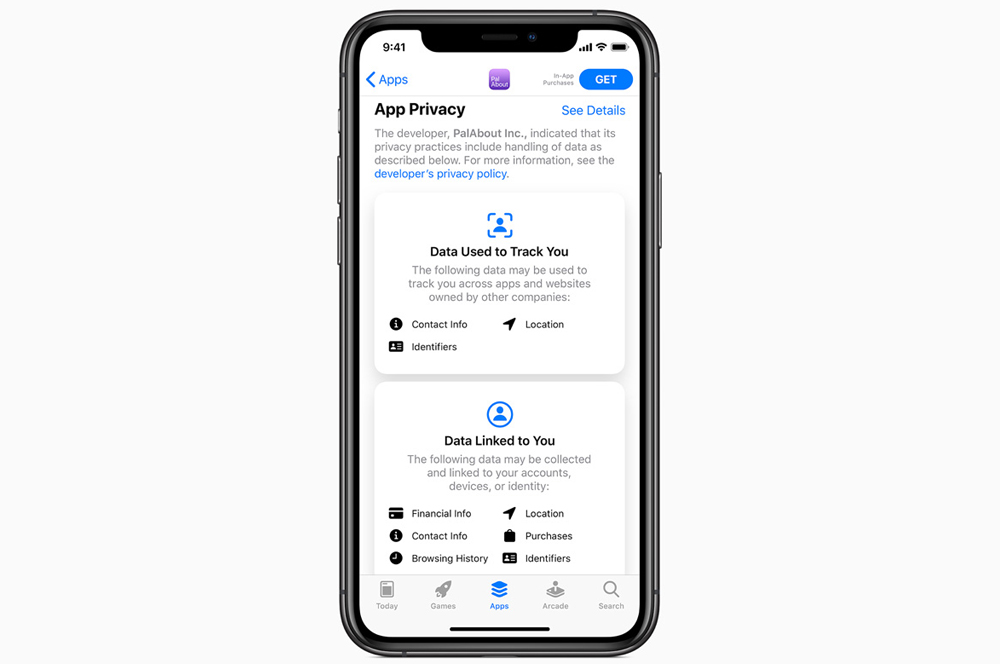
All apps will be required to get a user's permission before tracking. In addition, developers will be required to tell you which what data is linked to you, and what data sis used to track you. This is pitched as a privacy "nutritional label".
You'll also be able to share only your approximate location with apps, rather than exact location, for apps that don't need specifics such as weather.
New AirPods features
AirPods will now automatically switch between your devices. If you've got them paired to your iPhone and you pick up your iPad, they'll make the jump across with you. And if you get a call on your iPhone, they'll route back when you pick up. This functionality will also come to Powerbeats, Powerbeats Pro, and Beats Solo Pro.
AirPods Pro will also get spatial audio support - a surround sound like feature that makes it seem like audio is coming from in front of you or behind you. Apple says this audio will reposition itself as you move your head or your device to ensure it sounds natural. This will work with 5.1, 7.1, and Dolby Atmos audio content.
iOS 14 has new notifications that will let you know when you need to recharge your AirPods.
Smart home improvements
When adding new HomeKit supported devices to your smart home, iOS 14 will automatically suggest useful automations. The Home app will now prioritise important devices, which will make it easier to see if your smart lock is unlocked, for example.
Smart bulbs will gain adaptive light functionality, which will automatically adjust the colour temperature throughout the day.
Everything else
iOS 14 has plenty of other new features. These include:
- Compact phone notifications that no longer take up your entire screen
- Face masks for Memojis, and more age options
- Safari will alert you if a password you're using is not secure
- CarPlay supports new app types, including food ordering
- You'll be able to upgrade existing app accounts to use "Sign in with Apple"
- Improved camera speed
- Reminders can now be assigned to individual members if you've got a shared list
- Web page translation in Safari
- Achievements in Apple Arcade
- Picture-in-picture support for FaceTime
Can I update to iOS 14?
If your iPhone or iPod touch can run iOS 13, you'll be able to upgrade to iOS 14. Apple didn't drop support for any devices this time around.
As such, you can install iOS 14 on the following iPhones:
iPhone 11, iPhone 11 Pro, iPhone 11 Pro Max, the new iPhone SE, iPhone XS, iPhone XS Max, iPhone XR, iPhone X, iPhone 8, iPhone 8 Plus, iPhone 7, iPhone 7 Plus, iPhone 6s, iPhone 6s Plus, and the original iPhone SE.
iOS 14 is also compatible with the seventh generation iPod touch.
Alex Choros

Related Articles


