

Samsung Galaxy S20 Ultra Review: The Verdict
On paper, the Galaxy S20 Ultra should be the best phone that Samsung has ever released, but a few over-hyped features and an eye-watering price tag bring the 'Space Zoom' phone crashing back to Earth.
What we love
- Fast performance for everday use
- Probably the best smartphone screen you can buy
- Packed to the gills with tech and features
What could be improved
- Space Zoom camera is a real letdown
- Isn't great value for money
- We'd love to see two-day battery life, or better
The essentials
- Performance: As fast as you'd expect a $2,000 phone to be.
- Battery: A solid single day worth of battery life.
- Screen: One of the best smartphone screens, ever.
- Camera: Far from the best camera phone in market. Patient professionals will get good shots, but it's not for the point-and-shoot photographers (like me).
60/100
When US president Donald Trump sought to capture the imagination of his constituents, and the world, he announced Space Force: a new government agency that is far less interesting the more you dig into the details. If you're thinking X-Wing fighters or commandos in space suits, you're not even close.
Similarly, when Samsung wanted to grab headlines for the new Galaxy S20 Ultra it leaned in the same direction with 'Space Zoom'. The eye-popping 100x zoom functionality sounds impressive on paper, but like Trump's Space Force, it is far less impressive when you examine the details.
In general, the Galaxy S20 Ultra is exactly what we expect to see from a $2,000 phone made by Samsung. The design is sleek and functional, but not particularly exciting. I've been testing an S20 handset in the Cosmic Grey colour, which is far more grey than it is cosmic. Alternatively, you can go for equally not-Cosmic Cosmic Black.

- 6.9-inch display
- Samsung Exynos 990
- 128GB storage, 12GB RAM
- 108MP+48MP_12MP rear-facing, 40MP front-racing cameras
- 5,000mAh battery
To accommodate the large 6.9-inch screen and huge 5,000mAh capacity battery, the Ultra is a bigger and heavier than most smartphones. Most of the time I didn't notice this too much - I'm used to using bigger phones these days - but there are definitely times when the size becomes a drawback. Obviously, single-handed operation is all but impossible.
The quality of the screen almost makes up for all others concerns, though. Samsung has long been at the forefront of smartphone screen tech, and this is one of its best yet. Everything looks sharp, clear and colourful. There are three screen resolution options, but considering that higher resolutions use more battery power, I've had the test unit set to the lowest setting for most of my time with the Ultra and I seriously can't tell the difference.
I also really like that Samsung has dialled back on the curving edges on the screen in the S20 range. Glass curving around the edge of the phone may look cool, but I've found that it means that I'm much more likely to accidentally touch the edges of the screen by mistake. I found it was such a problem with last year's Galaxy S10 that I ended up moving all of my app icons to the centre of the screen and giving myself app-free gutters down along the sides of my home screen to avoid this frustration. The Galaxy S20 Ultra has no such issues.
One of the headline features for the IT crowd is a new 120Hz display refresh rate which, for those in the know, is something pretty special. To put it briefly, the refresh rate refers to how quickly the phone can redraw the image on the screen. The faster it can do this, the smoother the appearance of the animations when we use it. The easiest place to see the difference is when you are scrolling on a web page. With the 120Hz setting on, you can clearly see how smooth this motion is.
But, as with all cool things in tech, there is a downside to this buttery smooth scrolling: it hammers your battery life. This is clearly the reason why Samsung leaves the setting off by default, because as you'll see later, this phone doesn't need any help burning through battery life.
Camera Obscura
For all of the headline-grabbing facts and figures associated with the cameras in the Galaxy S20 Ultra, I'll say this upfront: I just don't like using this camera. I take photos everyday, mostly of my 18-month old son. During the several weeks I've spent taking photos with the Ultra, the number of out-of-focus photos vastly outnumber the images that look sharp and clear. And often it's not that the entire photo is blurry; there'll be a small area that comes our looking right, like one side of a face, or a hand or, most infuriating of all, the background of the photo.

I've also seen plenty of photos posted online that have been shot on an S20 Ultra and that look good, mostly photos of static structures, like buildings and bridges. But as I just mentioned, the things I photograph most don't stand still. I need a camera that focuses fast and accurately, and I have not found this in the S20 Ultra.
Now there are probably logical explanations for this. Samsung uses a periscope-like mirror array to achieve the optical zoom, and this may be making the plane of focus really shallow. It may be that the software isn't finely tuned; the way it is on better camera phones, like the Huawei P30 Pro and the Google Pixel series.
The zoom capabilities of this camera are there is you want to try them out, but the results aren't very exciting. At 10x zoom, things become a bit murky. At 30x zoom, your subjects are recognisable, but these are hardly photos for your Instagram. At 100x zoom, you may as well be looking at an impressionist painting. Subjects are barely recognisable through the large, blurry blobs of colour that make up the photos.
We looked at the different zoom options in our comparison here.
The thing is, the reasons behind why my photos look terrible don't make up for the fact that my photos look terrible. I now have several weeks of memories relegated to the recycle bin. Sure, I'm not a smartphone photographer, but then neither are most of the people who will think about buying this phone. If you want a phone camera that you can pull out of your pocket and shoot reliable photos without any fuss, then this is definitely not the phone camera for you.
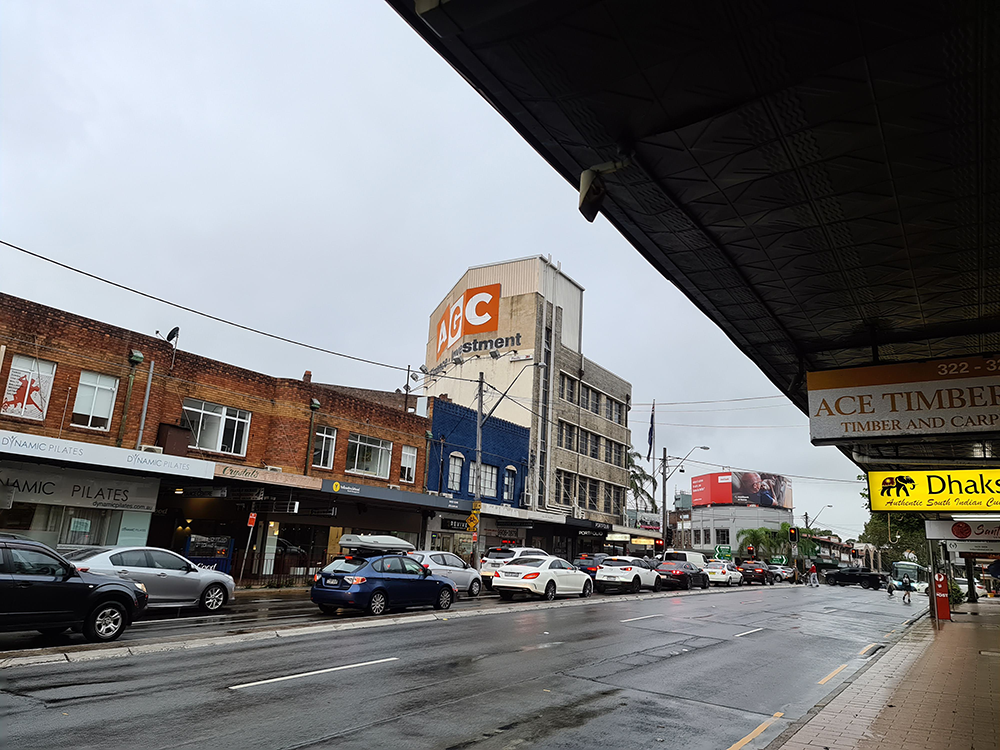
The Galaxy S20 Ultra never struggles to photograph static objects, like buildings.
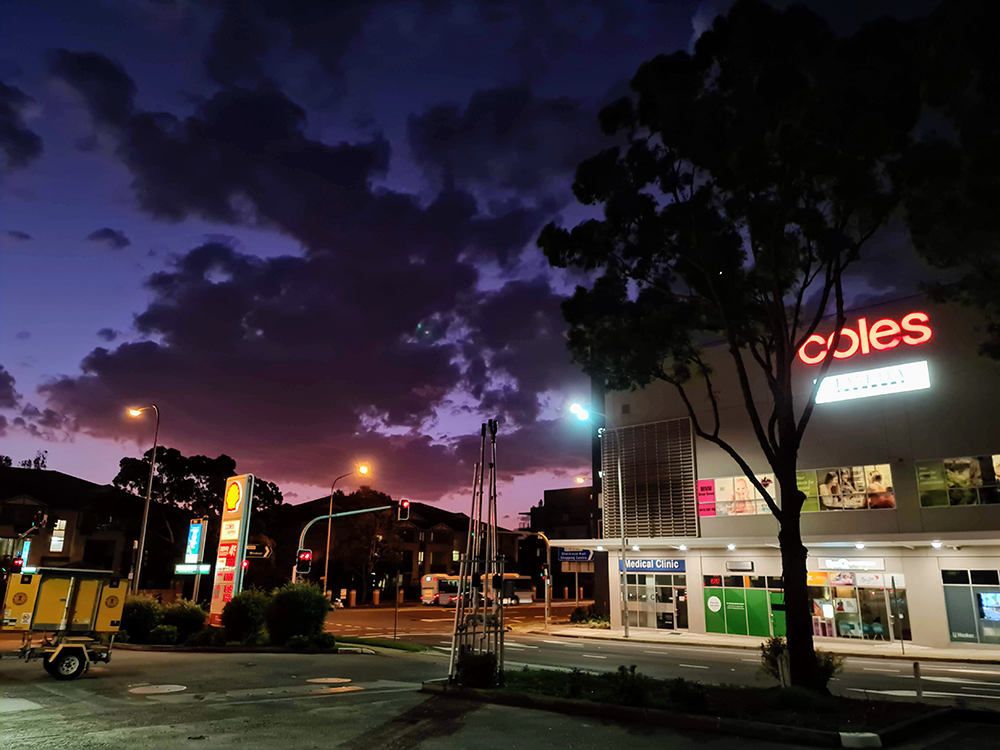
The night mode is pretty impressive. Several of the shots I took after-dark had a surreal, almost supernatural colour palette that I thought was kind of fun.

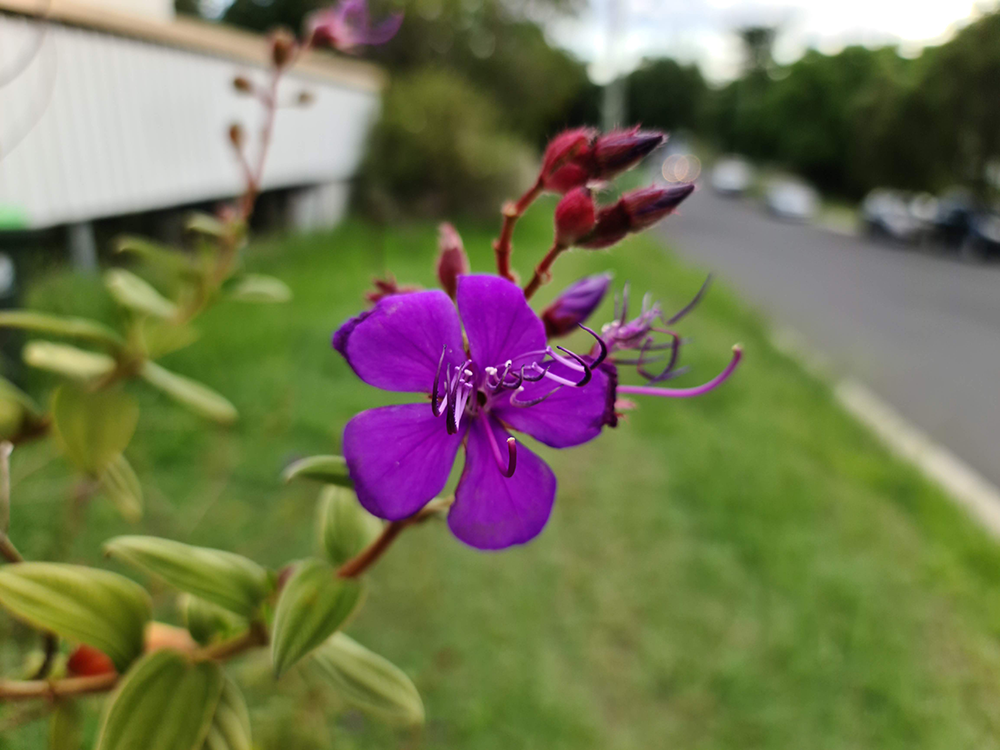

This is an example of the focus issues I noticed. This shot was taken letting the camera software take full control and you can see here how the focus on the face is soft, but the handlebars of the bike are in focus.
Battery life
Given the size of the screen and the numerous techy bits and pieces in the Galaxy S20 Ultra, Samsung was always going to need a big battery. At 5,000mAh capacity, the battery in this phone is among the biggest we've ever seen in a smartphone.
On paper, this sounded like we'd finally see a Samsung phone that could comfortably keep running for well over a single day. Sadly, in our experience, this was not the case. To be clear, we can definitely enjoy a full day's worth of use and get to bed with power to spare. There was never a day when we ran out of juice. But when you have a phone that is this big and heavy (not to mention expensive) we had hoped for more.
On the upside, Samsung includes a 45W super fast charging cable in the box with the Ultra which can charge up most of the battery in about an hour, which is remarkable when the battery is this big.
After using the phone for several days on the default power settings, we did dip into the options and set the phone to one of the power saving modes. This setting turns off 5G and the 'Always On' display, limits the CPU to 70% capacity, dims the screen by 10% and reduces the screen resolution from it's maximum to 'Full HD+' mode.
With these limitations in place, the phone finally pulled through to about two days worth of use between charges, depending on how heavily we used the phone on each day. And happily, we couldn't really tell that the limitations were in place. The phone still ran quickly and the screen looked as sharp as ever.
Everything else (and we mean everything)
It's also worth noting that the Samsung Galaxy S20 Ultra has everything else you'd expect to find in a phone, and plenty of things that you may never have even heard of.
- Wireless power sharing
- A pretty awesome Kids Mode option
- Secure folders and the ability to have messaging apps installed twice so you can use different accounts
- Samsung Bixby voice assistant AND Google's voice assistant
- In-screen fingerprint scanner
- A number of 'Digital Wellbeing' controls to help you use your phone less
Samsung Galaxy S20 Ultra - Final Thoughts
Samsung, I'm not angry, I just disappointed. The S20 Ultra is a very capable phone, but you really don't need to pay this much money for a capable smartphone. What you may have paid the big bucks for is a smartphone camera with 100x zoom, but unfortunately this still doesn't exist in a phone, despite what Samsung would have you believe.
In fact, the best experience we had with the S20 Ultra were after we had switched off all of the headline features. We turned off 5G, slowed the screen refresh rate and the CPU and avoided the 108MP shooting mode. We basically rolled the phone back to 2018 before we finally had the phone running in the ways we feel are most important - fast and with long battery life. Of course, if you were smart, you'd just buy a phone from 2018 and save yourself a lot of money.
| Phone model | Storage | Price |
|---|---|---|
| Samsung Galaxy S20 FE 4G | 128GB | $999 |
| Samsung Galaxy S20 FE 5G | 128GB | $1,149 |
| Samsung Galaxy S20 4G | 128GB | $1,349 |
| Samsung Galaxy S20 5G | 128GB | $1,499 |
| Samsung Galaxy S20 Plus 4G | 128GB | $1,499 |
| Samsung Galaxy S20 Plus 5G | 128GB | $1,649 |
| Samsung Galaxy S20 Plus 5G | 512GB | $1,899 |
| Samsung Galaxy S20 Ultra 4G | 128GB | $1,999 |
| Samsung Galaxy S20 Ultra 5G | 512GB | $2,249 |
| Galaxy S20 | Galaxy S20+ | Galaxy S20 Ultra | |
|---|---|---|---|
| Display | 6.2-inch OLED | 6.7-inch OLED | 6.9-inch OLED |
| Resolution | Quad HD | Quad HD | Quad HD |
| Rear Cameras | 12MP + 64MP + 12MP | 12MP + 64MP + 12MP + ToF | 108MP+ 48MP + 12MP + ToF |
| Front Camera | 10MP | 10MP | 40MP |
| Processor | Exynos 990 | Exynos 990 | Exynos 990 |
| RAM | 8GB or 12GB | 8GB or 12GB | 12GB or 16GB |
| Storage | 128GB | 128GB or 512GB | 128GB or 512GB |
| Battery | 4,000mAh | 4,500mAh | 5,000mAh |
| Water-Resistance | IP68 | IP68 | IP68 |
| 5G | Optional | Optional | Yes |
| Price | From $1,349 | From $1,499 | From $1,999 |
Joseph Hanlon

Related Articles


